




Overview
Send a Shift from Trafftrak to SiteStory in a single click.
Traffic management companies running both platforms can push any Shift they want documented from Trafftrak straight into SiteStory as a Site, no manual re-entry required. The Team Leader assigned to the Shift is automatically assigned to the Site too, and if they don't already have a SiteStory account, one is created for them on the spot, complete with an invite email and a link to the mobile app. They're in the field and ready to capture a Story within minutes.
How it works
Once the integration is activated on both platforms, sending a Shift to SiteStory is a manual, one-click action from Trafftrak.
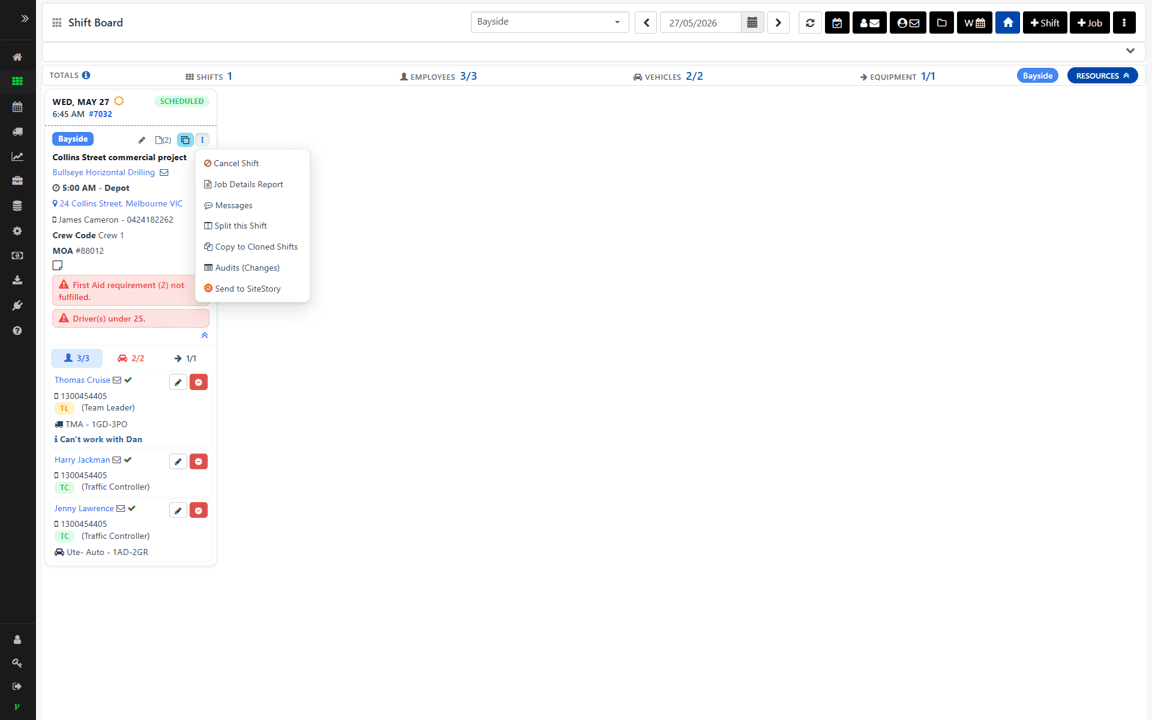
From any Shift record in Trafftrak, click the SiteStory button to send it across. The Shift is created instantly as a Site in SiteStory, and the Team Leader assigned to that Shift is automatically assigned to the Site.
If the Team Leader doesn't already have a SiteStory member account, one is created for them instantly. They're assigned to the Site and sent an invite email with their login details and a link to download the SiteStory mobile app.
From there, the Team Leader simply opens the app, finds the Site, and records and uploads their Story as normal.
Configure
You'll need a paid subscription plan for both SiteStory and Trafftrak, and Admin permissions on both platforms.
Generate an API token in SiteStory under Settings → Integrations, then copy it into Trafftrak under the Integrations module to activate the connection.
Once connected, the SiteStory button becomes available on Shift records in Trafftrak, ready to push a Shift across whenever you need a Story captured.

The purpose-built video documentation platform for traffic management and construction. One tap. Organised automatically. Ready when you need it most.


