
Go Back
Construction Compliance Documents for Fast-Changing Sites
Discover how to produce accurate construction compliance documents on traffic management sites where conditions shift hourly, without slowing down your crew.


Why traditional daily diaries fail on traffic management sites — and how to build capture workflows that keep pace
Learn why standard construction documentation best practices break down when site configurations change hourly, not weekly. This guide shows traffic management teams how to close the gap between what's logged and what actually happened — reducing liability without adding paperwork.
TL;DR
Traffic sites change too fast for daily diaries - Configurations shift multiple times per shift, but traditional daily reports capture conditions once. The gap between what's logged and what happened is where liability concentrates.
Documentation is a speed problem, not a process problem - The bottleneck isn't what to document; it's capturing it fast enough that crews actually do it. Video walkthroughs at every configuration change take under two minutes and produce stronger evidence than detailed written reports.
Automate metadata, centralise storage, plan for retrieval - Manual timestamps get challenged in disputes. Documentation scattered across personal phones gets lost. Build your system so that capture, timestamping, storage, and retrieval all work without relying on human memory or discipline.
Crew adoption determines documentation quality - The best system is the one your least tech-comfortable crew member will actually use. Minimise friction ruthlessly: fewer taps, automatic uploads, zero manual data entry.
Test your retrieval before you need it - Pick a random job from three months ago and try to assemble a complete documentation package. If it takes more than 30 minutes, your system has a retrieval problem that will cost you when a claim arrives.
Guide Orientation: What This Covers and Who It's For
This guide tackles one problem: how to produce accurate compliance records on traffic sites where conditions shift hourly — without burying your crew in paperwork. It's for operations leaders, site supervisors, and compliance managers who handle daily reports, audit readiness, and liability protection on road and civil projects. This guide tackles one problem: how to produce accurate compliance documents on traffic sites where conditions shift hourly — without burying your crew in paperwork. It's for operations leaders, site supervisors, and compliance managers who handle daily reports, audit readiness, and liability protection on road and civil projects.
By the end, you'll know why standard methods fail on fast-changing sites, how to build a capture workflow that keeps pace, and what steps cut your compliance risk without adding time to your crew's day. By the end, you'll know why standard methods fail on fast-changing sites. You'll learn how to build a capture workflow that keeps pace with shifting setups. And you'll see what steps cut your compliance risk without adding time to your crew's day. This guide does not cover general office-based document management (RFIs, submittals, change orders) or software selection for back-office workflows. The focus is field-side: what happens between setup and demobilisation, and how you prove it.
Why Construction Documentation Best Practices Matter More on Traffic Sites
Traffic sites are nothing like a typical building site. A building site changes week to week. A traffic site can shift setup multiple times in one shift: lane closures move, tapers get adjusted, signs relocate based on live conditions, and emergency changes happen without warning. Daily diaries were built for sites that hold still long enough to describe. Traffic sites don't cooperate.
The gap between what's logged and what actually happened is where liability lives. When an incident occurs, the first question an insurer, regulator, or client asks is: "What were the site conditions at the time?" A daily diary someone writes at 4:30 PM about a configuration that existed at 9:00 AM is not an answer. It's a guess dressed up as documentation.
The cost of getting this wrong is substantial. 33% of Australian business leaders cite compliance burden as a leading negative impact on their business. For traffic management operators, the compliance challenge can be painful: one disputed incident with insufficient documentation can wipe out an entire contract's margin and damage your standing with the client.
Clients increasingly expect evidence-based verification from their traffic management partners. Meeting that expectation starts with recognising that documentation on dynamic sites is a speed problem, not a process problem.
Core Concepts: Static Documentation vs. Dynamic Reality
The Static Site Assumption
Most documentation workflows assume a fixed site that changes slowly. You record the state once, note changes, and update now and then. That works when a concrete pour looks the same at 7 AM and 3 PM. It breaks when your site shifts with road conditions, weather, breakdowns, and client calls throughout the day.
Configuration Drift
Configuration drift is what happens between documentation events. Your crew sets up per the Traffic Management Plan (TMP) and Traffic Guidance Scheme (TGS), you record the setup, then conditions force changes. Each change is valid and needed — but if you don't capture it, your records show a site that no longer exists. This isn't a discipline failure. It's how traffic work operates. Your method needs to account for it, not pretend it doesn't happen. This is what happens between documentation events. Your crew sets up per the Traffic Management Plan (TMP) and Traffic Guidance Scheme (TGS). You document the setup. Then, conditions force changes. Each change is valid, but if it isn't captured, your records show a site that no longer exists. Configuration drift isn't a discipline failure. It's how traffic work operates. Your documentation needs to account for it, not pretend it doesn't happen.
The Proof Hierarchy
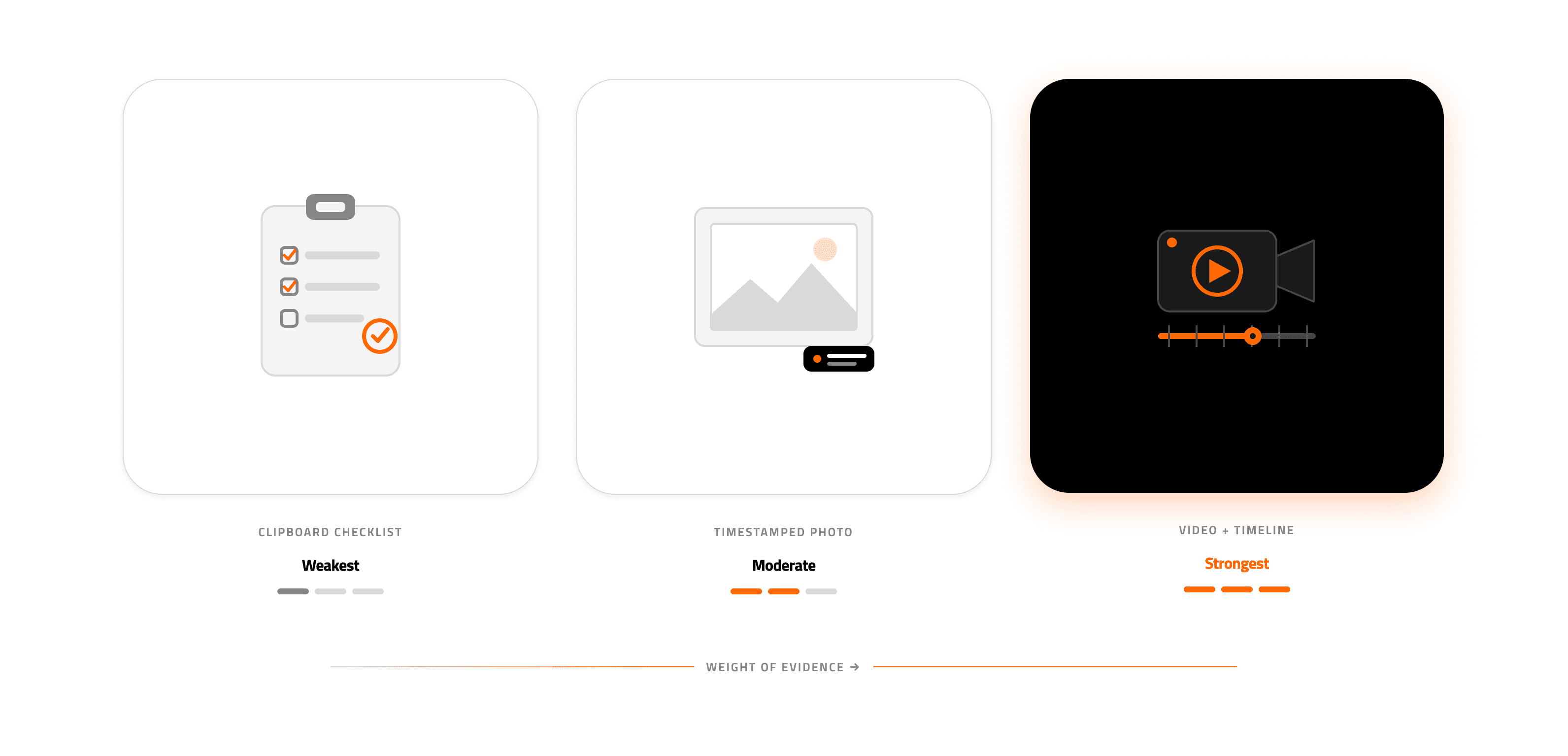
Not all records carry equal weight in a dispute. Written notes rank weakest — they're subjective and written after the fact. Timestamped photos are stronger but show only chosen moments and angles. Video is strongest because it captures context, sequence, and conditions that a photo or note cannot. Know this hierarchy before deciding where to invest your effort.
Crew Friction
The best system in the world is worthless if your crew won't use it. Every extra step, every form field, every app that needs three taps instead of one creates friction. Friction leads to shortcuts. Shortcuts lead to gaps. Gaps lead to liability. The core tension is thoroughness versus adoption. This guide helps you resolve it. The best documentation system is worthless if your crew won't use it. Every extra step, form field, or app that needs three taps instead of one creates friction. Friction leads to shortcuts. Shortcuts lead to gaps. Gaps lead to liability. The core tension is thoroughness versus adoption. Solving that tension is what this guide is about.
The Framework: Capture, Timestamp, Centralise, Retrieve
Effective documentation on fast-changing sites follows a four-stage cycle. Each stage solves a specific failure mode, and skipping any one of them undermines the others.
Capture refers to recording site conditions in a format that reflects reality. On dynamic sites, this means visual documentation (video or photo) rather than written descriptions, captured at a frequency that matches the rate of change.
Timestamp means every piece of documentation carries automatic, tamper-resistant time and location metadata. Manual timestamps prove unreliable, and opposing parties contest them in disputes.
Centralise means all documentation flows to a single accessible repository, not scattered across individual phones, software systems, and email threads. Centralised systems are essential for managing safety data across crews and preventing the fragmentation that leads to compliance failures.
Retrieve means you can find the right documentation within minutes when an auditor, insurer, or client asks for it. Documentation that exists but can't be located quickly is functionally the same as documentation that doesn't exist.
These four stages form a continuous loop. On a traffic management site that changes configuration three times per shift, the cycle runs three times per shift. The framework is only as strong as its weakest stage.
Step-by-Step: Building a Documentation Workflow for Dynamic Sites
Step 1: Audit Your Current Documentation Gaps
Objective: Identify where your existing process fails to capture what actually happens on site, so you can target improvements rather than overhaul everything at once.
Start by pulling your daily diaries from the last three months and comparing them against known site changes. Look for days where you know configurations changed (weather events, client instructions, emergency modifications) and check whether the documentation reflects those changes. In most operations, you'll find that daily diaries describe initial setup conditions and final conditions, with little or no record of what happened in between.
Talk to your site supervisors. Ask how often they make changes that don't end up in the daily diary. The answer is almost always "several times." Ask why. The answer is almost always "no time" or "too much hassle." These conversations show whether your problem is process (the system doesn't ask for mid-shift updates) or behaviour (it asks, but crews skip it because it's too slow).
Anti-patterns: Don't assume your documentation is adequate because you haven't been caught yet. Absence of claims is not evidence of compliance. Don't survey only office staff; the gap between what the office thinks happens and what the field actually does is often the widest blind spot.
Success indicators: You can identify specific, recurring documentation gaps. You understand whether the root cause is process design, tool friction, or both. You have concrete examples of undocumented changes that would have been problematic if an incident had occurred.
Step 2: Define Your Capture Frequency Based on Rate of Change
Objective: Match your documentation frequency to how often your site actually changes, rather than defaulting to "once per shift" because that's what the template says.
Categorise your typical jobs by rate of change. Some traffic management sites (long-term lane closures on highways) might hold a single configuration for days. Others (rolling closures, intersection work, event traffic management) might change multiple times per hour. Your documentation frequency should correspond to these categories, not to an arbitrary shift schedule.
For high-change sites, the practical minimum is documentation at every configuration change: after initial setup, after each significant modification, and at pack-down. For moderate-change sites, documentation at setup, midpoint, and pack-down may be sufficient. The key decision is what counts as a "significant modification." A useful rule: if a change would be visible to a driver approaching the site, it's significant enough to document.
This is where the format of documentation matters enormously. Asking a crew member to write a detailed description of every configuration change is unrealistic. Asking them to do a 60-second video drive-through is not. Traffic management contractors who have switched from photos to video report saving 10 to 15 minutes per site while producing better evidence, because video captures context that individual photos miss.
Anti-patterns: Don't set a capture frequency you know your crews can't maintain. An ambitious schedule your crew ignores is worse than a modest schedule they follow, because the ambitious one creates a false sense of coverage. Don't treat all sites identically; a one-size-fits-all frequency wastes time on static sites and under-documents dynamic ones.
Success indicators: You have a clear, simple categorisation of job types by change frequency. Each category has a defined documentation schedule. Your crews understand the schedule and consider it realistic.
Step 3: Choose Capture Methods That Eliminate Crew Friction
Objective: Select documentation tools and formats that your field crews will actually use consistently, prioritising speed and simplicity over feature richness.
The biggest predictor of documentation quality isn't tool sophistication. It's whether your crew uses the tools. Every second between "I should document this" and "it's done" is a second where someone might decide it's not worth the effort. That's why capture speed matters more than almost anything else on dynamic sites.
Video is the highest-value, lowest-friction format for traffic management documentation. A crew member walking the site with a phone captures signs, tapers, distances, road conditions, and surrounding context in a single continuous recording. Compare this to the alternative: taking 8 to 12 individual photos, each requiring framing and angle decisions, then writing descriptions of what each photo shows. Tools like SiteStory reduce this further to a single tap, which removes the cognitive overhead that causes crews to skip documentation when they're busy or tired.

Whatever tool you choose, test it with your least tech-comfortable crew member. If they can't produce usable documentation within 90 seconds of arriving at the task, the tool is too complex for field use. This is a hard filter, but it's the right one. The Australian construction industry employs over 1.3 million workers, and the vast majority of field workers are not technology enthusiasts. Your documentation workflow needs to meet them where they are.
Anti-patterns: Don't select tools based on feature lists or office demonstrations. A platform that looks impressive in a boardroom presentation but requires five steps to start recording will fail in the field. Don't require crews to add metadata manually (location, time, job number) when technology can capture it automatically.
Success indicators: Your crew can complete a full documentation capture in minutes. Adoption is consistent across all crew members, not just the tech-savvy ones. Documentation quality doesn't degrade on busy days or during overtime shifts.
Step 4: Automate Timestamps and Metadata
Objective: Ensure every piece of documentation carries automatic, verifiable time, date, and location data that no one can dispute after the fact.
Manual timestamps are the weakest link in traffic management documentation. A crew member who documents a configuration at 10:15 AM but doesn't log it until 2:00 PM has created a record with questionable temporal accuracy. In a dispute, opposing counsel will ask: "How do you know this photo was taken at the time you claim?" If the answer is "because someone wrote it down later," the evidentiary value drops significantly.
Modern phones automatically embed GPS coordinates, timestamps, and device IDs in photos and videos. Your workflow should preserve this metadata, not strip it out. Better yet, use a platform that shows it clearly and blocks retroactive edits. The goal: records that prove themselves — metadata shows when and where capture happened, no testimony needed.
On traffic sites, location metadata does double duty. It proves where you captured the record. And it can verify that the setup matches the approved TMP & TGS for that spot. That's powerful in audits. The question isn't just "did you document?" It's "Does your documentation match what was approved?"
Anti-patterns: Don't rely on crews to manually enter time and location. They'll forget, round off, or estimate, and the resulting records won't withstand scrutiny. Don't use platforms that allow backdating or editing of metadata after capture.
Success indicators: Every piece of documentation in your system carries automatic, uneditable timestamps and GPS coordinates. You can demonstrate the chain of custody for any record from capture to current storage.
Step 5: Centralise Storage and Establish Naming Conventions
Objective: Ensure all documentation flows to a single, organised repository that any authorised person can search and retrieve from quickly.
The most common storage failure in traffic management operations is fragmentation. Photos live on individual crew members' phones. Daily reports sit in email inboxes. Video files get shared via messaging apps and then deleted to free up phone storage. When an incident occurs six months later, and someone needs to reconstruct site conditions, the documentation scavenger hunt begins and often fails.
Centralised storage solves this, but only if it's paired with a consistent organisational structure. At a minimum, you should organise documentation by job number, date, and capture time. More sophisticated systems add configuration state (setup, modification, pack-down) and crew member identity. The key principle is that someone who wasn't on site should be able to find the relevant documentation within five minutes using only the job number and date.

Cloud storage is a must for multi-crew operations. If your records live on a hard drive in one office, field supervisors can't reach them, clients can't verify work, and one hardware failure wipes them out. Cloud storage costs a fraction of one undocumented incident.
Anti-patterns: Don't let documentation accumulate on personal devices. Phones get lost, damaged, replaced, and wiped. Don't create a centralised system that requires manual uploads at the end of the day; automatic syncing is essential because "I'll upload it later" is the most common last step before documentation disappears forever.
Success indicators: All documentation from the past 30 days is in a single system. Any authorised user can find documentation for a specific job and date within five minutes. No documentation exists solely on individual crew members' personal devices.
Step 6: Build Retrieval Workflows Before You Need Them
Objective: Prepare your retrieval process now so that when an auditor, insurer, or client requests documentation, you respond in hours rather than days or weeks.
Documentation has two critical moments: capture and retrieval. Most teams focus on capture and ignore retrieval until a crisis hits. By then, you're scrambling through messy files under pressure — the worst way to build a compliance response.
Build a retrieval protocol that answers three questions: Who can request records? How fast must you respond? Who assembles the package? The most common scenarios are: post-incident investigation (insurer or regulator wants site conditions at a specific time), client audit (quarterly or annual compliance review), and dispute resolution (disagreement over whether work followed the TMP & TGS).
For each scenario, prepare a template response package. Know in advance what documentation you'll need to pull, what format it should be in, and who reviews it before release. Video documentation is particularly powerful in dispute resolution because it provides context that written records and individual photos cannot. A 90-second site drive-through video often resolves disputes that would otherwise require days of back-and-forth over written descriptions.
Anti-patterns: Don't wait for a claim to test your retrieval process. Run a drill: pick a random job from three months ago and see how long it takes to assemble a complete documentation package. If it takes more than 30 minutes, your system needs work. Don't assume that having documentation means you can find documentation.
Success indicators: You can produce a complete documentation package for any job within 30 minutes of a request. Your team knows who handles retrieval requests and what the expected turnaround is. You've tested this process at least once on a non-urgent basis.
Practical Examples: What This Looks Like in the Field
Scenario 1: Intersection Closure with Multiple Configuration Changes
A crew sets up a four-way intersection closure at 6:00 AM. By 8:00 AM, a utility crew requests access to the northeast quadrant, requiring a modified taper and temporary sign relocation. At 11:30 AM, the original configuration is restored. At 2:00 PM, afternoon traffic volume triggers a planned switch to a two-lane configuration. The crew packs down at 5:00 PM.
Under a traditional daily report, this job gets one entry describing "intersection closure per TMP, modified for utility access mid-morning, packed down at 1700." That's four distinct configurations compressed into two sentences. If a near-miss occurs during the 11:30 AM reconfiguration, the daily report provides almost no useful information about what the site looked like at that moment.
Under the capture-at-every-change approach, this job produces four video walkthroughs (setup, utility modification, restoration, and afternoon switch) plus a pack-down record. Each carries automatic timestamps and GPS data. Total additional crew time: approximately eight minutes across the full day. Liability protection: comprehensive.
Scenario 2: The Six-Month-Old Claim
A motorist files a claim alleging inadequate signage at a worksite six months after the job. Your crew has no specific memory of the day in question. Under a text-based daily report system, you have a generic entry confirming setup was "per plan." Under a video documentation system, you have timestamped footage showing every sign, its placement, its condition, and its visibility from the driver's approach. The insurer resolves the claim in their first review rather than escalating to litigation. The difference in cost and management time is measured in thousands of dollars and dozens of hours.
Common Mistakes and Pitfalls
The most predictable failure is treating documentation as a back-office concern rather than a field operation. When people who don't work on traffic sites design documentation workflows, they inevitably prioritise completeness over speed, creating forms and processes that look thorough on paper but get abandoned in practice.
A second common mistake is documenting only at the start and end of a job. This captures the two moments least likely to face a dispute and misses everything in between. The valuable documentation is mid-shift, during transitions and modifications, when conditions are most likely to deviate from the plan.
Third, many operations invest in capture technology without solving the storage and retrieval problem. Thousands of photos and videos sitting in an unsearchable folder are a documentation theatre. They create the appearance of compliance without delivering the substance. If you can't find it when you need it, you don't have it.
Finally, expecting perfect adoption on day one is unrealistic. Crews need time to build habits. Start with your highest-risk job types, demonstrate the value when documentation resolves a real issue, and expand from there.
What to Do Next
Start with the audit from Step 1. Pull your daily diaries from three recent jobs where you know configurations changed mid-shift. Compare what's documented against what actually happened. The size of that gap tells you how urgently you need to act.
If the gap is significant, pick one crew and one job type to pilot a higher-frequency capture workflow. Keep it simple: video walkthrough at every configuration change, automatic upload to a central location. Run the pilot for two weeks and measure two things: crew compliance (did they actually capture at every change?) and retrieval speed (can you find the right footage within five minutes?).
This guide is a reference, not a checklist. Revisit it as your operations evolve, as client expectations shift, and as you learn which parts of your documentation workflow hold up under real scrutiny and which ones don't. The goal is not perfect documentation. The goal is documentation that's accurate enough, fast enough, and findable enough to protect your crew, your contracts, and your reputation.
Frequently Asked Questions
What is construction documentation automation?
Construction documentation automation means using technology to cut or remove manual steps in recording, organising, and storing site records. For traffic management, this means replacing handwritten reports and manually uploaded photos with tools that auto-capture timestamps, GPS data, and metadata — then sync everything to a central repository. No manual uploads or data entry needed.
Why do daily reports in construction fail on traffic management sites?
Daily reports assume conditions stay stable all day. Traffic sites often change setup multiple times per shift — due to live traffic, client calls, weather, or emergencies. One end-of-day report squeezes hours of changes into a few sentences. That creates a gap between what's documented and what happened. That gap is where liability lives.
How can video documentation reduce rework and disputes in construction?
Video captures what photos and written notes can't: spacing between signs, taper distances, road conditions, and the full site environment — all in one timestamped recording. When a dispute arises, a 90-second drive-through video often settles it on the spot. Written records and single photos need interpretation and are easier to challenge.
How do I get field crews to actually adopt new documentation habits?
Adoption depends on friction. Every additional step, form field, or app interaction reduces the likelihood that crews will document consistently, especially under time pressure. The most effective approach is to choose tools that require minimal interaction (ideally a single action to start recording), eliminate manual metadata entry, and automate uploads. Start with a small pilot on one crew, demonstrate value through a real example where documentation resolved an issue, and expand gradually.
When should contractors consider going paperless with documentation?
The trigger is usually a near-miss: a claim you struggled to defend, an audit that exposed gaps, or a client who demanded evidence you couldn't produce. However, the best time to transition is before that trigger event. If your current documentation process relies on end-of-day written reports and photos stored on individual phones, you already have significant retrieval and liability risk. Start by centralising what you have, then layer in faster capture methods.
Which document types should be automated first in construction projects?
For traffic management operations, prioritise site condition records (setup verification, mid-shift configuration changes, and pack-down documentation) because auditors, insurers, and clients request these records most often during disputes or audits, and manual processes leave them most likely to be incomplete. Once field capture is reliable, extend automation to compliance checklists, incident reports, and client-facing verification packages.
Sources
More post you may like

Video Documentation
Thought leadership
Video Evidence for Disputes: What You Can Prove
20 Sept 2026
·
Adam Ricketts

Industry Insights
Video Documentation
Regulatory Compliance in Construction: A Crew Documentation Guide
8 July 2026
·
Adam Ricketts

Industry Insights
Video Documentation
Reduce Rework in Construction: Blame the Gap, Not the Crew
1 July 2026
·
Adam Ricketts

Thought leadership
7 Construction Productivity Improvement Fixes for Traffic Crews
22 May 2026
·
Adam Ricketts

The purpose-built video documentation platform for traffic management and construction. One tap. Organised automatically. Ready when you need it most.


